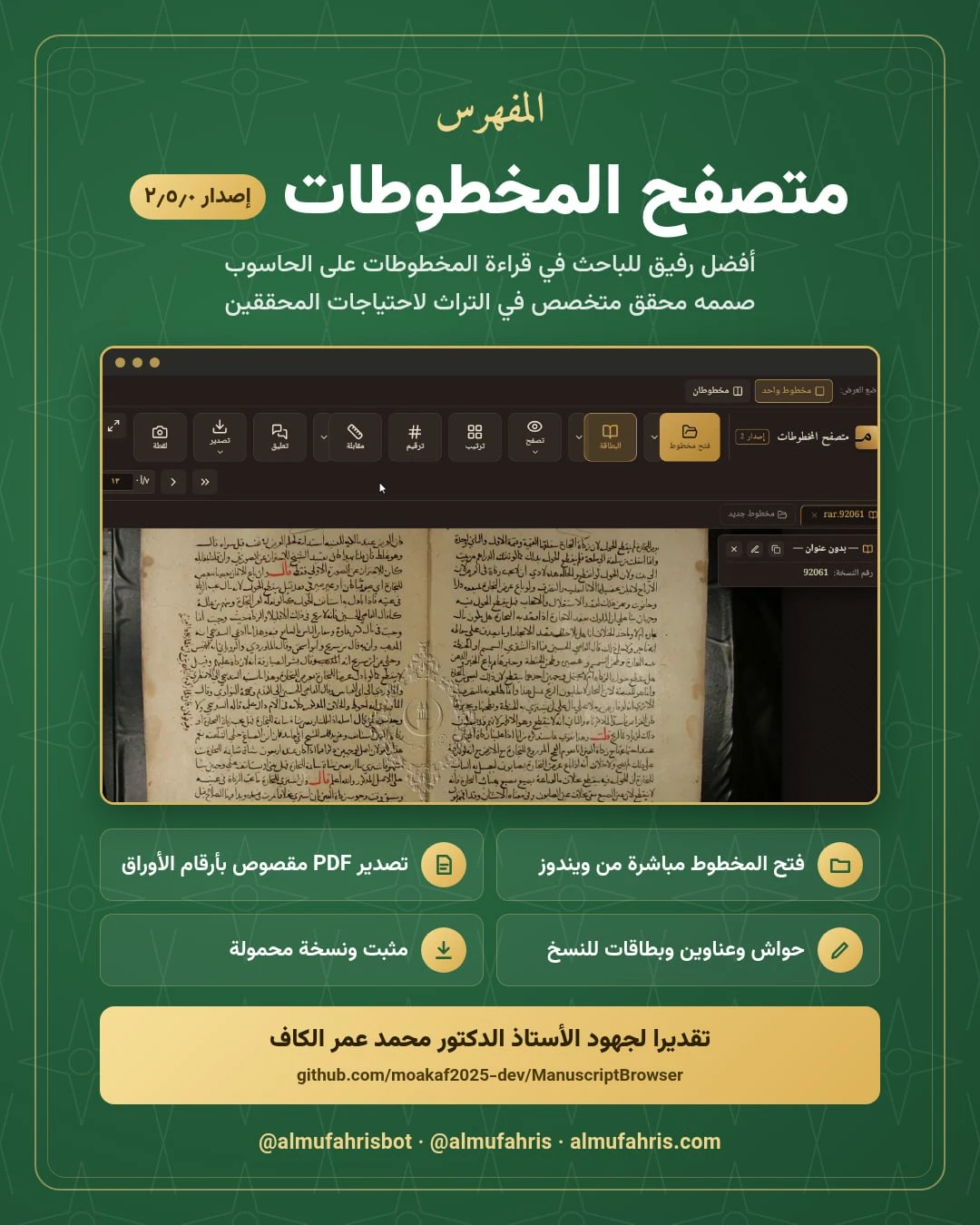
Once you have downloaded a manuscript from Al-Mufahris to your computer, you need to read it comfortably, number its folios, annotate it and cite it. Manuscript Browser (Mutaṣaffiḥ al-Makhṭūṭāt) is a free Windows program built for exactly that by Dr. Mohammed Omar Ahmed al-Kaf, an editor and scholar of Islamic heritage texts, with the manuscript researcher’s needs in mind. We strongly recommend it, and feature it here in appreciation of his service to the manuscript heritage.
Watch the video · The video is in Arabic, from Dr. Mohammed Omar al-Kaf’s channel
What it opens
PDF files, image archives (ZIP or RAR) and single images, the formats manuscripts are usually distributed in, with a list of recently opened manuscripts. Since version 2.5.0 the program is listed in Windows’ “Open with” menu, so you can open a file with it directly without changing your default PDF reader.
Main tools
- Record card: title, author, copyist, library, shelfmark, date of copying and more, which can be copied as a table for citation.
- Viewing: zoom up to 1000%, rotation, image filters (invert, smooth, sharpen, saturation) and a hand tool; plus automatic image enhancement, tuned on one leaf and applied to the whole manuscript.
- Foliation: a step-by-step wizard that splits double-page images down the middle (even along a slanted gutter) and numbers the folios in the standard manuscript form: 1a, 1b…
- Page reordering: for manuscripts photographed out of order, common with composite volumes (majāmīʿ) and loose quires.
- Collation ruler: a transparent horizontal ruler for line-by-line collation, with adjustable style, height and width.
- Notes and headings: annotate specific areas of a page with an automatic reference to the folio number, and build headings and an index of notes.
- Export: export the foliated manuscript to PDF with folio bookmarks (1a, 1b…) in any PDF reader’s sidebar; export notes and headings to Word with correct Arabic numbering; and compress very large image files.
- Snip: select any area of the manuscript, add a caption and save it as a PNG image, ready for papers and presentations.
New in version 2.5.0
- Open a manuscript straight from Windows via “Open with”, with a single program window however many files are opened
- A proper installer alongside the portable version
- A warning before opening a manuscript larger than 500 MB, instead of a silent freeze
- A backup reminder on closing if notes, headings or cards have not been saved
- A warning when closing a manuscript shown split, so the work of adjusting the cut is not lost
- An illustrated user guide, opened from a button under “About”, and further performance and memory fixes
Download
The program runs on Windows and comes in two forms:
- Installer (recommended):
ManuscriptBrowser-2.5.0-setup.exeadds it to the Start menu and desktop and registers it under “Open with” for PDF, image and archive files. - Portable version:
ManuscriptBrowser-2.5.0-portable.exeruns without installation, even from an external drive.
⬇ Download version 2.5.0 from GitHub
A suggested workflow
Download the manuscript file from Al-Mufahris in Telegram, right-click it and choose “Open with” → Manuscript Browser. Split and foliate the pages with the foliation wizard, fill in the record card, and take notes as you read, each tied automatically to its folio. At the end you have a foliated PDF and a Word file of your notes, ready for your research.
For suggestions and bug reports you can contact the author directly on Telegram.