Found a copy that matters? Save it so you don't lose it.

Watch the video · The video is in Arabic
In this video
How to save, organise and follow your manuscript search results in Al-Mufahris, inside Telegram.
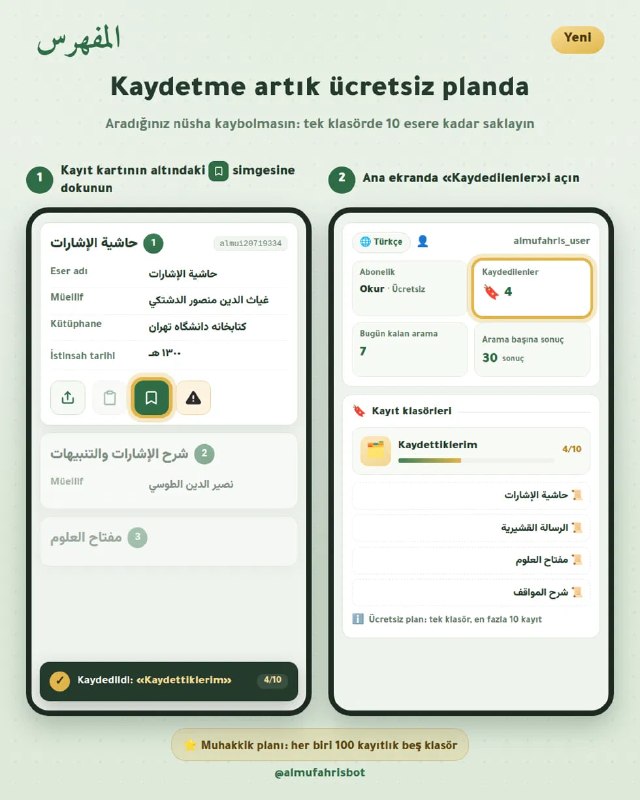
- Save any record with one tap on the button under the card
- Organise your bookmarks into five folders and name each folder after its topic
- If a file becomes available for the copy after you save it, or its data are corrected, you see it in your bookmarks
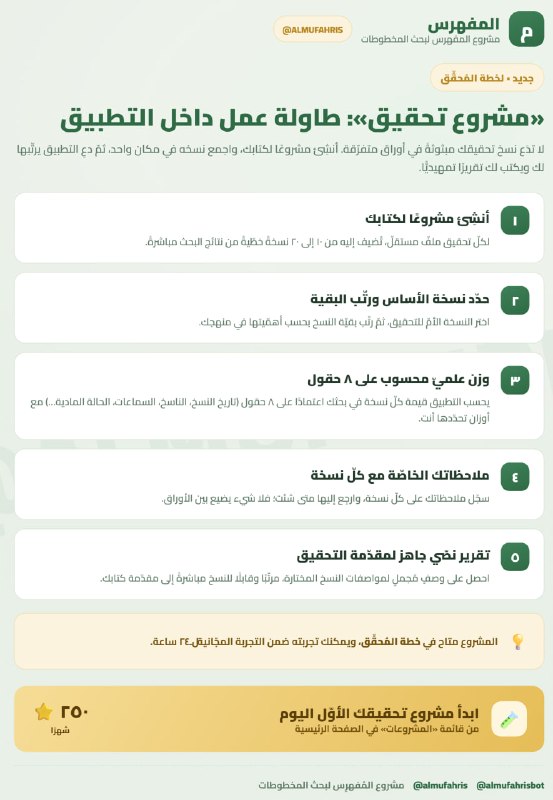
- Move any saved record into a research project
- Export the folder to Excel
- For Researcher-plan subscribers (since 15 October 2026 the free plan also includes one folder of 10 records)
- Tap under the record card.
- Open “Bookmarks” on the home page to find what you saved.
Capacity on each plan
- Free plan: one folder holding 10 records.
- Researcher plan: five folders of up to 100 records each; saved records can also be added to a critical-edition project, and each folder gets its own sheet in the Excel export.